

 한국어
한국어 中文简体
中文简体 日本語
日本語 Español
 русский
About us
Our team is proud to offer on time guarantee and product guarantee to customer satisfaction.
Read MoreContact info
- No. 666, Jingtong Road, Danxi Second Industrial Zone, Danxi Town, Yueqing City, Zhejiang, China
- 1696258355@qq.com
- (+86) 15217722885
- 1540939529@qq.com
- (+86) 17857205859
- (+86) 755-83268071
Side Push Tactile Switch for Compact Electronics
Side Push Tactile Switch products are designed for electronic devices where the button needs to be operated from the side rather than from the top. This structure gives designers another way to arrange controls when the available internal space is limited. Instead of placing the actuator above the PCB, the switch can work with a button located along the edge or side of the product enclosure.
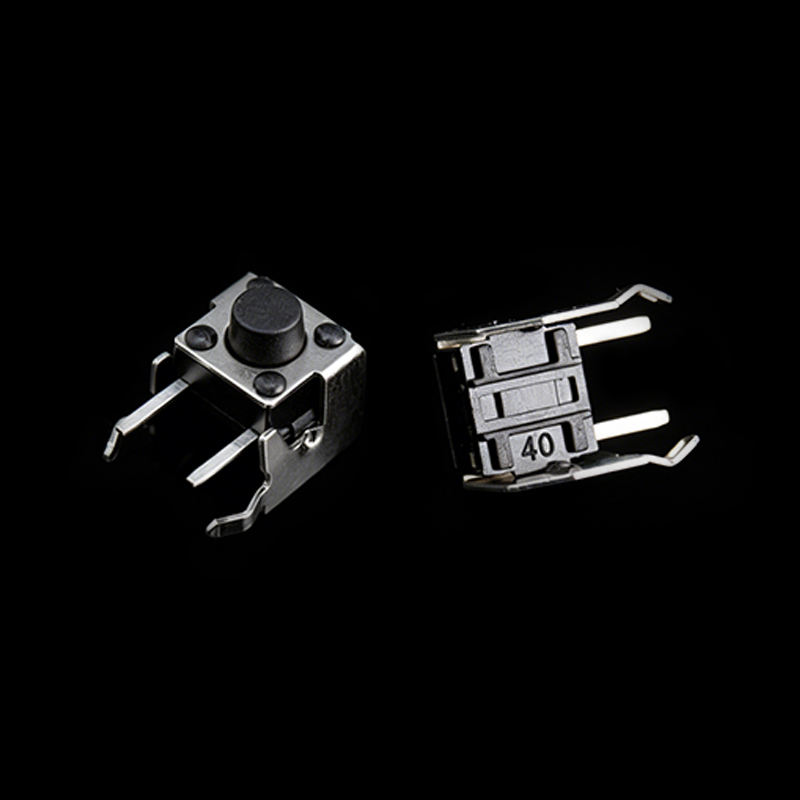
This design is useful when the mechanical structure of a device requires a horizontal operating direction. The switch can be positioned close to a PCB edge while the external button remains accessible through an opening in the housing. Such an arrangement can help connect the electronic circuit with the physical control structure without requiring a large vertical space.
PCB Space and Device Structure
Compact electronics often contain several components within a restricted enclosure. Display modules, batteries, connectors, processors, sensors, speakers, and other parts may share the same internal area. A Side Push Tactile Switch can provide additional flexibility when planning the location of a control button.
The switch position needs to correspond with the PCB layout and the housing structure. Designers should check the distance between the switch and nearby components before completing the mechanical design. Enough clearance should be provided around the actuator so that the external button can move freely.
PCB edge placement can also be useful when a product has a side control interface. The switch can be positioned near the edge, allowing the actuator to connect with the external button through a suitable mechanical structure.
Low Profile Product Design
The physical height of a tactile switch can influence the internal arrangement of a compact electronic product. A suitable low profile structure can help designers manage the vertical space between the PCB and the enclosure.
The actuator also needs to match the housing. Its position, length, shape, and movement should correspond with the button design. If these elements are not aligned properly, the user may experience uneven operation or incomplete switch activation.
Mechanical drawings and three dimensional models can assist engineers during this stage. These documents allow the switch dimensions to be compared with the enclosure and PCB before production.
Portable Electronics
Side Push Tactile Switch products can be used in portable electronics that require accessible side controls. Portable audio devices may use side buttons for playback, volume, or function selection. Cameras can use side mounted controls for mode changes or other settings.
Wearable products can also benefit from side actuation. A small enclosure may not provide enough space for a traditional top mounted switch. A side button can offer a practical control position while keeping the main surface available for a display or other interface.
Remote controls and compact electronic instruments can also use side switches where the enclosure design calls for lateral operation.
Mechanical Alignment
Mechanical alignment is an important consideration for side actuated switches. The PCB position, switch body, actuator, button cap, and enclosure opening should work together.
The external button should apply force to the intended actuator area. Uneven pressure can affect the tactile response and may place unnecessary stress on the switch or surrounding structure.
Engineers should also consider the direction of the applied force. Side operation means that the switch receives pressure from a horizontal direction. The supporting PCB structure and solder joints therefore need to correspond with the mechanical design.
Tactile Feedback
A tactile switch is not only an electrical component. It also forms part of the user interface. Operating force, travel, and tactile response affect how a button feels during use.
A suitable tactile response can help users recognize that a command has been activated. Different devices can require different button characteristics. A portable device may need a softer touch, while another control interface may require a firmer response.
Prototype testing can help engineers evaluate these characteristics before the final design is approved.
Product Enclosure Integration
The switch should be considered together with the enclosure rather than as an isolated component. The housing opening needs to correspond with the actuator position, while the button cap needs enough space to move without rubbing against surrounding surfaces.
Designers should also check assembly procedures. The switch, PCB, button, and enclosure need to fit together in a practical sequence.
Careful coordination between electrical and mechanical design can help create a side control structure that fits the product layout and provides a consistent operating experience.

©️ 2026 Wenzhou Hanjing Electronics Co., Ltd.

Waterproof Switch Manufacturer
